Conditional Dropdowns
Build dependent (cascading) dropdowns in Google Forms from a Google Sheet — the next dropdown filters by an earlier answer, with a choice eliminator for used-up options.
Quick Answer
How do I make dependent (conditional) dropdowns in Google Forms?
Use Formfacade's Lookup Sheets and pick 'Conditional dropdowns from your Sheets data'. Connect your form and a sheet whose columns hold the related options, then describe the dependency — e.g. 'populate Category from the Category column, then filter Product by the selected Category'. When a respondent picks a value in the first dropdown, the next dropdown filters in real time to show only the matching choices. You can chain multiple levels, like Category to Sub-category to Product.
Conditional dropdowns make one dropdown depend on another: pick a value in the first, and the next dropdown shows only the choices that match — filtered live from your Google Sheet. You can chain several levels, and used-up choices can drop out automatically (a built-in choice eliminator).
First, the shared setup
Every Lookup task starts the same way — Try it free, connect your form, connect your sheet. If you haven't done that yet, see Set it up on the Lookup Sheets overview. This guide picks up at the Configure step.
Use case
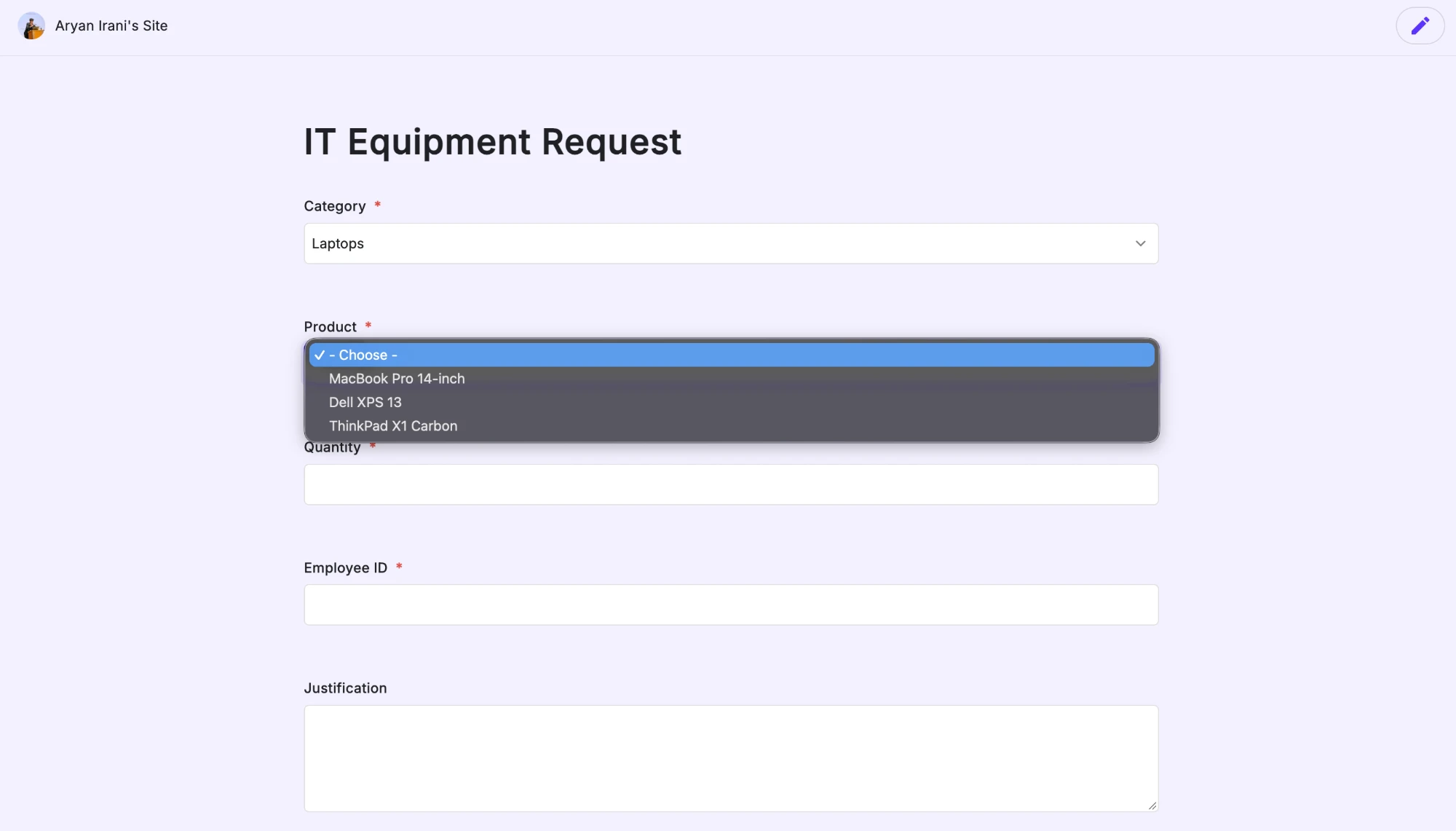
An IT Equipment Request form has a Category dropdown (Laptops, Monitors, Accessories). When a respondent picks Laptops, the Product dropdown filters to show only laptop models — so no one can request a product that doesn't belong to the chosen category.
Both dropdowns are powered by one Product Catalog sheet, where each row ties a product to its category:
| Category | Product |
|---|---|
| Laptops | MacBook Pro 14-inch |
| Laptops | Dell XPS 13 |
| Laptops | ThinkPad X1 Carbon |
| Monitors | Dell UltraSharp 27-inch |
| Monitors | LG 4K 32-inch |
| Monitors | Samsung ViewFinity 34-inch |
| Accessories | Logitech MX Master 3S |
| Accessories | Keychron K2 Keyboard |
| Accessories | USB-C Hub |
| Accessories | Webcam 1080p |
Set it up
Pick Conditional dropdowns from your Sheets data at the start — the Connect form screen reads "add conditional choices," and notes that later dropdowns can depend on earlier answers and used-up choices disappear.

After connecting your form and the catalog sheet, describe the dependency at the Configure step — for example "Populate the Category dropdown with the distinct values from the Category column. Then filter the Product dropdown to show only the products whose Category matches the Category selected above." Review it and click Proceed.

Formfacade confirms what it built: Category lists every distinct category, and Product is a dependent dropdown that auto-filters to the selected category.

The result
On the live form, the Product options change with the Category. Pick Laptops and only the three laptops appear:
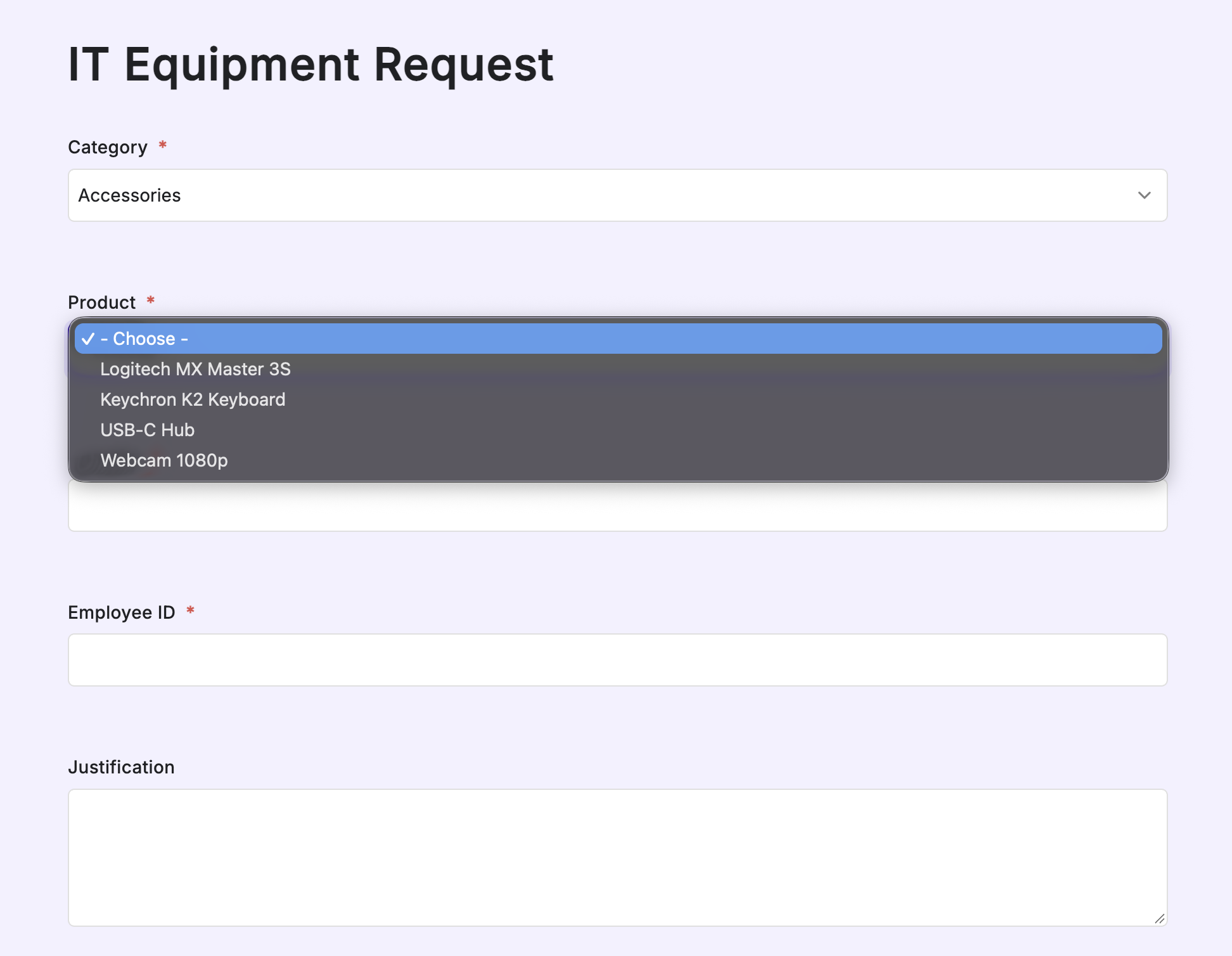
Switch to Accessories and the Product dropdown updates to just the accessories — the same dependency works for every category:
Good to know
| Behavior | Detail |
|---|---|
| Dependency | The later dropdown filters in real time by the earlier answer |
| Multiple levels | Chain dependencies, e.g. Category → Sub-category → Product |
| Multiple sheets | The dropdown and its filter can read from different sheets |
| Choice eliminator | Choices that are used up can be dropped from later submissions — useful for one-per-respondent items like asset tags or time slots |
| Sync | Every 30 minutes, or on every form submission; read-only |
Next steps
- Simpler single dropdown? See Populate a Dropdown.
- Fill related fields on selection? See Autofill Fields.
- Not sure how to express it? Let Connect with AI set it up for you.